nuxt.js 的使用
nuxt 是什么
- nuxt.js 是服务端渲染(SSR)的一种解决方案,当然 nuxt.js 也支持 SPA,SSR 与 SPA 的区别,请移步这里
- nuxt.js 整合了 webpack,vue-loader,vuex,vue-router,vue-meta 等组件/框架
- nuxt.js 结合 vue 提供了一系列的钩子函数来支持服务端渲染
- nuxt.js 可实现
代码分层、服务端渲染,路由,异步数据,静态文件,ES6/7,打包压缩JS/CSS,meta标签管理,热加载,支持LESS/SASS,支持HTTP2推送,自定义中间件 - 目前官网最新版本是 V2.4.5
nuxt 的执行顺序
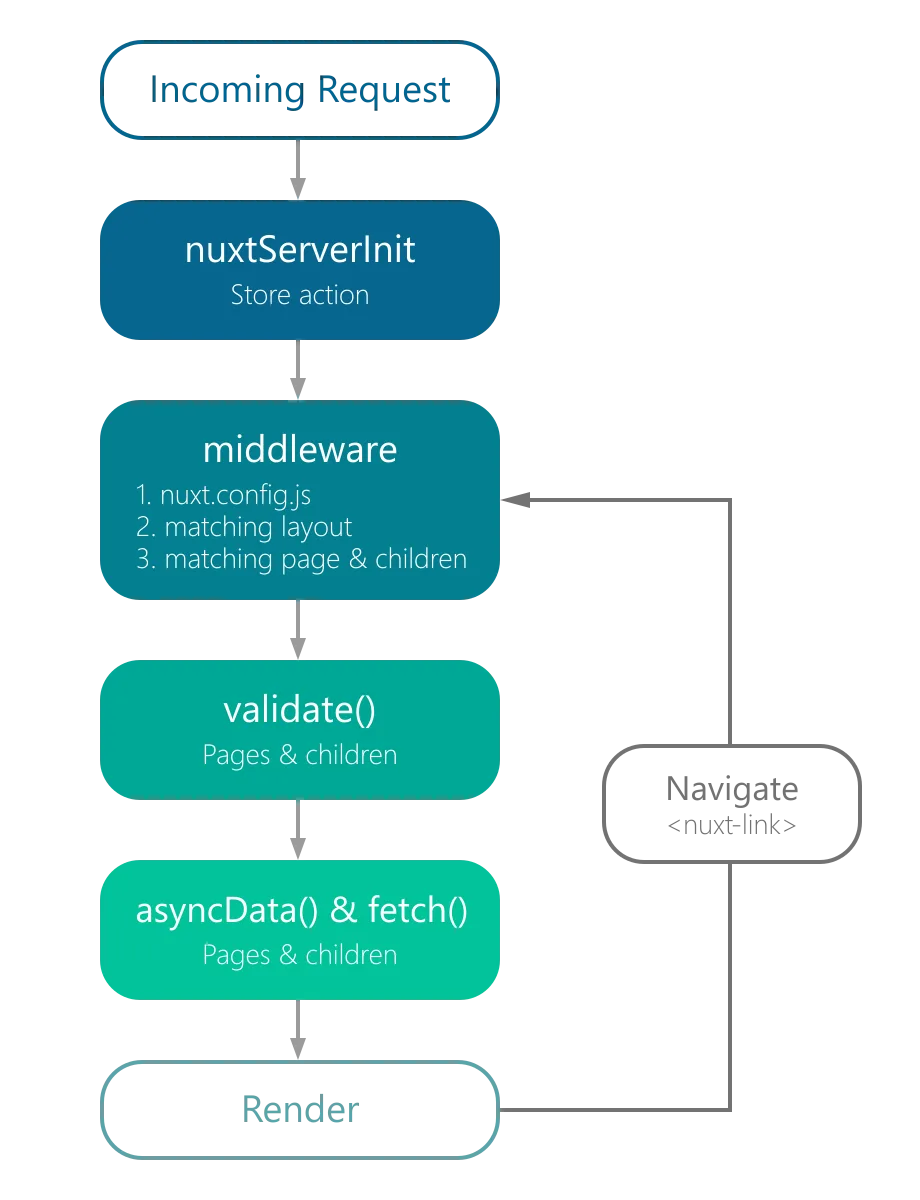
nuxt 快速生成项目
- npx create-nuxt-app <项目名>
- npm run dev
nuxt 的目录结构
- assets
放未编译的静态文件,如 common.less、util.js
- components
放一些项目用的共用组件
- layouts
放一些布局组件,如 header 和 bottom 组件,其中想要让其他内容夹在 header 和 bottom 之间,可以这样用
<div>
  <p>header</p>
  <nuxt />
  <p>bottom</p>
</div>
- middleware
放一些中间件,需要在 nuxt.config.js 中引入
// middleware/stat.js
router: {
  middleware: 'stats';
}
- pages
放一些视图文件,nuxt 会根据文件名自动生成路由,比如 archive.vue 就会生成"/archive",多级文件,可以是动态路由,比如 pages/search/_keyword.vue 对应"/archive/:keyword"
- plugins
放一些插件,比如封装一层 axios 就可以写一个插件,需要在 next.config.js 中引入
- static
static 放一些静态文件,比如/static/robots.txt 映射至 /robots.txt
- store
Vuex 状态树
- nuxt.config.js
Nuxt.js 应用的个性化配置
别名
- ~ 或 @ 代表 src 目录
- ~~ 或 @@ 代表根目录
nuxt.config.js 的常用结构
module.exports = {
  /*
   ** Headers of the page
   */
  head: {
    title: '何健的博客 ',
    meta: [
      {
        charset: 'utf-8'
      },
      {
        name: 'author',
        content: '1051931999@qq.com'
      },
      {
        name: 'viewport',
        content: 'width=device-width, initial-scale=1'
      },
      {
        hid: 'keywords',
        name: 'keywords',
        content: 'Vue, Nuxt, Node, 前端开发, JavaScript'
      },
      {
        hid: 'description',
        name: 'description',
        content: '基于Vue.js和Node.js开发的前端博客'
      }
    ],
    script: [
      {
        innerHTML: 'console.log("hello")',
        type: 'text/javascript',
        charset: 'utf-8'
      }
    ],
    // 不对<script>标签中内容做转义处理
    __dangerouslyDisableSanitizers: ['script'],
    link: [
      {
        rel: 'icon',
        type: 'image/x-icon',
        href: '/favicon.ico'
      }
    ],
    script: [
      {
        src: 'http://at.alicdn.com/t/font_461741_hvf5e66iab6.js'
      }
    ]
  },
  // css
  css: [
    {
      src: '~/assets/less/index.less',
      lang: 'less'
    },
    {
      src: 'highlight.js/styles/atelier-cave-light.css'
    }
  ],
  // 加载进度条
  loading: {
    color: '#3B8070',
    failedColor: '#e93030'
  },
  // 自定义 webpack 的构建配置
  build: {
    extend(config, ctx) {
      if (ctx.dev && ctx.isClient) {
        config.entry['polyfill'] = ['babel-polyfill'];
        config.module.rules.push({
          enforce: 'pre',
          test: /\.(js|vue)$/,
          loader: 'eslint-loader',
          exclude: /(node_modules)/
        });
        // 添加 alias 配置
        Object.assign(config.resolve.alias, {
          assets: path.resolve(__dirname, 'assets'),
          components: path.resolve(__dirname, 'components')
        });
      }
    }
  },
  babel: {
    presets: ['es2015', 'stage-2'],
    plugins: ['transform-async-to-generator', 'transform-runtime'],
    comments: true
  },
  plugins: [{ src: '~/plugins/axios' }]
};
具体内容可参考官网
路由
- nuxt 建议路由跳转使用
<nuxt-link :to="`/about/${name`}">关于</nuxt-link>
- 中间件
中间件就是路由跳转之间执行的部分
// middleware/stats.js
import axios from 'axios';

export default function({ route }) {
  console.log(route.fullPath);
  return axios.get('http://api.help.bj.cn/apis/weather?id=101060101').then(
    (res) => {
      // console.log(res)
    },
    (err) => {}
  );
}
nuxt.config.js 的引入参考上面
nuxt.js 为*.vue 文件提供了一系列的钩子函数
asyncData
- 异步数据处理,该方法在页面组件加载之前被调用,也就是说 console.log 出来的数据无法在 web 中看到,只能在命令行中看到,所以就可以隐藏接口,用户在网页中看不到请求的接口。
- Nuxt.js 会将 asyncData 返回的数据融合组件 data 方法返回的数据一并返回给当前组件。
- asyncData 本身是一个 promise,所以可以用 async/await
// {params}可以获取到动态路由
// { req, res }可以获取到用户请求的req和res对
export default {
  async asyncData({ params }) {
    let { data } = await axios.get(`https://my-api/posts/${params.id}`);
    return { title: data.title };
  }
};
fetch
- fetch 方法用于在渲染页面前填充应用的状态树(store)数据, 与 asyncData 方法类似,不同的是它不会设置组件的数据。
- fetch 是操作 vuex 的
fetch ({ store, params }) {
  return axios.get('http://my-api/stars')
  .then((res) => {
    store.commit('setStars', res.data)
  })
}
head
- 用来设置 meta 标签和 title
head () {
  return {
    title: this.title,
    meta: [
      { hid: 'description', name: 'description', content: 'My custom description' }
    ]
  }
}
layout
- 用于设置使用哪个模板的
layout: 'error',loading
- 顶部的加载条
 mounted () {
  this.$nextTick(() => {
    this.$nuxt.$loading.start()

    setTimeout(() => this.$nuxt.$loading.finish(), 500)
  })
}
transition
- 过渡动画
transition (to, from) {}validate
- 校验路由的
alidate({ params }) {
  // Must be a number
  return /^\d+$/.test(params.id);
},
middleware
- 路由中间件,在页面渲染之前完成
在 nuxt 中使用 vuex
- 首先在 store 下建立 index.js 文件
export const state = () => ({
  num: 0
});

export const mutations = {
  increment(state) {
    state.num++;
  },
  decrement(state) {
    state.num--;
  }
};
export const getters = {
  getNum(state) {
    return state.num;
  }
};
- 在 page 下的 vue 文件执行 vuex 操作
<button @click="toClick">button</button>
import { mapGetters, mapMutations } from 'vuex';
export default {
  computed: {
    ...mapGetters(['getNum'])
  },
  methods: {
    ...mapMutations({
      setPlus: 'increment',
      setDesc: 'decrement'
    }),
    toClick() {
      console.log(this.$store);
      this.setPlus();
      console.log(this.getNum);
      this.setDesc();
    }
  }
};
确认评论邮箱
邀请制评论