import msgboxVue from './index.vue'

// 定义插件对象
const MessageBox = {}

// vue的install方法,用于定义vue插件
MessageBox.install = function(Vue, options) {
  const MessageBoxInstance = Vue.extend(msgboxVue)
  let currentMsg
  const initInstance = () => {
    // 实例化vue实例
    currentMsg = new MessageBoxInstance()
    let msgBoxEl = currentMsg.$mount().$el
    document.body.appendChild(msgBoxEl)
  }
  // 在Vue的原型上添加实例方法,以全局调用
  Vue.prototype.$msgBox = {
    showMsgBox(options) {
      if (!currentMsg) {
        initInstance()
      }
      if (typeof options === 'string') {
        currentMsg.content = options
      } else if (typeof options === 'object') {
        Object.assign(currentMsg, options)
      }
      return currentMsg
        .showMsgBox()
        .then(val => {
          currentMsg = null
          return Promise.resolve(val)
        })
        .catch(err => {
          currentMsg = null
          return Promise.reject(err)
        })
    }
  }
}
export default MessageBox
效果
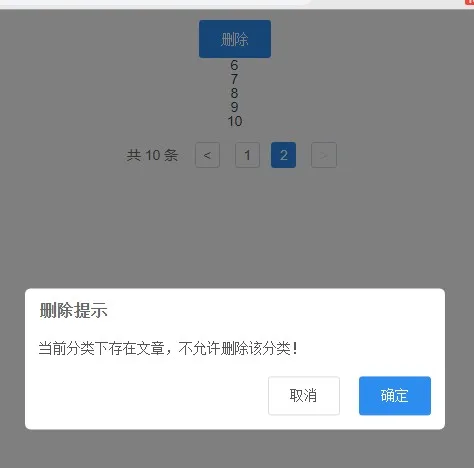
用 vue.js 的方式注册一个全局组件
this.$msgBox.init({
  title: '这是我的title',
  content: '这是我的content',
  single:false,
  confirmName:"ojbk",
  cancelName:"要不起"
},function(){
  console.log('concel');
},function(){
  console.log('confirm');
})
var __MESSAGEBOX__ = ''
__MESSAGEBOX__ += '<div class="messageBox" v-show="showbox">'
__MESSAGEBOX__ += '            <div class="mask"  @click="showbox==false"></div>'
__MESSAGEBOX__ += '            <div class="box">'
__MESSAGEBOX__ += '                <div class="text">'
__MESSAGEBOX__ += '                    <h3>{{title}}</h3>'
__MESSAGEBOX__ += '                    <p>{{content}}</p>'
__MESSAGEBOX__ += '                </div>'
__MESSAGEBOX__ += '                <div class="button clearfix" v-show="!single">'
__MESSAGEBOX__ += '                    <p class="cancel" @click="cancel">{{cancelName}}</p>'
__MESSAGEBOX__ += '                    <p class="confirm red" @click="confirm">{{confirmName}}</p>'
__MESSAGEBOX__ += '                </div>'
__MESSAGEBOX__ += '                <div class="button clearfix" v-show="single">'
__MESSAGEBOX__ += '                    <p class="confirm red single " @click="confirm">{{confirmName}}</p>'
__MESSAGEBOX__ += '                </div>'
__MESSAGEBOX__ += '            </div>'
__MESSAGEBOX__ += '        </div>'
var vueObject = {
  props: {
    title: {
      type: String,
      default: '标题'
    },
    content: {
      type: String,
      default: '内容'
    },
    cancelName: {
      type: String,
      default: '取消'
    },
    confirmName: {
      type: String,
      default: '确认'
    },
    single: {
      type: Boolean,
      default: false
    },
    showbox: {
      type: Boolean,
      default: false
    }
  },
  data: function() {
    return {
      cancelObj: null,
      confirmObj: null
    }
  },
  methods: {
    init: function(options, cancel, confirm) {
      this.showbox = true
      this.title = options.title
      this.content = options.content
      this.cancelName = options.cancelName
      this.single = options.single
      this.confirmName = options.confirmName
      this.cancelObj = cancel
      this.confirmObj = confirm
    },
    cancel: function() {
      this.showbox = false
      this.remove()
      this.cancelObj()
    },
    confirm: function() {
      this.showbox = false
      this.confirmObj()
      this.remove()
    },
    remove: function() {
      setTimeout(() => {
        this.$destroy()
        document.body.removeChild(this.$el)
      }, 300)
    }
  },
  mounted: function() {},
  template: __MESSAGEBOX__
}
var message = {}
message.install = function(Vue, options) {
  var MessageboxInstance = Vue.extend(vueObject)
  var currentMsg = ''
  let initInstance = function() {
    currentMsg = new MessageboxInstance()
    var msgBoxEl = currentMsg.$mount().$el
    document.body.appendChild(msgBoxEl)
  }
  Vue.prototype.$msgBox = {
    init: function(options, cancel, confirm) {
      if (!currentMsg) {
        initInstance()
      }
      if (typeof options === 'string') {
        currentMsg.content = options
      } else if (typeof options == 'object') {
        $.extend(currentMsg, options)
      }
      return currentMsg.init(options, cancel, confirm)
    }
  }
}
Vue.use(message)
// messageBox组件样式
.messageBox {
  height: 100rem;
  position: fixed;
  width: 100%;
  left: 0;
  top: 0;
  background: rgba(0, 0, 0, 0.3);
  z-index: 200;

  .mask {
    height: 100rem;
    position: fixed;
    width: 100%;
    left: 0;
    top: 0;
    background: rgba(0, 0, 0, 0.3);
  }

  .box {
    width: 5.60rem;
    height: auto;
    border-radius: 0.06rem;
    background: #fff;
    position: fixed;
    left: 50%;
    top: 50%;
    -webkit-transform: translate(-50%, -50%);
    transform: translate(-50%, -50%);

    .text {
      padding: 0.42rem;

      h3 {
        font-size: 0.36rem;
        font-weight: 500;
        text-align: center;
        padding-bottom: 0.1rem;
        color: #333333;
      }

      p {
        font-size: 0.34rem;
        color: #333333
      }
    }

    .button {
      height: 0.85rem;
      line-height: 0.85rem;

      p {
        float: left;
        width: 50%;
        text-align: center;
        -webkit-box-sizing: border-box;
        box-sizing: border-box;
        font-size: 0.34rem;
      }

      .cancel {
        border-top: solid 1px #dddddd;
        border-right: solid 1px #dddddd;
      }

      .confirm {
        border-top: solid 1px #dddddd;
      }

      .single {
        width: 100%;
      }

      &.red {
        color: #fe5d4e;
      }
    }
  }
}
确认评论邮箱
邀请制评论