如果对 z-index(层叠样式表)是什么还不太自信,可以看MDN
使用 z-index 常见的问题
- 为什么我设置了 z-index:9999,或者 z-index:-9999,但是没生效
- 设置了定位属性,也设置 float 属性,怎么 z-index 就出问题了
- z-index:0,z-index:1,z-index auto 有什么区别
定义一些概念
- 定位元素:设置了 position:relative|absolute|fixed 属性
- 非定位属性:没有设置 position:relative|absolute|fixed 属性
z-index 的一些场景
顺序原则
对于全都是非定位元素,文档流后面的 DOM 元素会覆盖前面的 DOM 元素
* {
  margin: 0;
  padding: 0;
}
.box {
  width: 50px;
  height: 50px;
  border: solid;
  display: inline-block;
}
.red {
  background: red;
}
.green {
  background: green;
}
.box1 {
  margin-left: 0;
}
.box2 {
  margin-left: -50px;
}
<div class="box red box1"></div>
<div class="box green box2"></div>
定位原则
- 对于一个定位元素和非定位元素,定位元素会覆盖非定位元素
- 对于两个都是定位元素,遵循覆盖顺序原则
- 对于两个都是非定位元素,但是第一个的子元素是定位元素,那么子元素的层级是最高的
- z-index 只对定位元素有效,层级关系会跟随 z-index 变化,z-index 值越大,层级越大
- z-index 设置为 0 和没有设 z-index 的元素在同一 dom 级中没有高低之分
- z-index 在现代浏览器中默认是 auto
* {
  margin: 0;
  padding: 0;
}
.box {
  width: 50px;
  height: 50px;
  border: solid;
  display: inline-block;
}
.red {
  background: red;
}
.green {
  background: green;
}
.box1 {
  position: relative;
  left: 50px;
}
.box2 {
}
<div class="box red box1"></div>
<div class="box green box2"></div>
父子规则
- 如果 box1,box2 都是定位元素,且 box1 的层级大于 box2 的层级,box1 有子元素,那么 box1child 永远是覆盖在 box2 上,它不受 z-index 影响,因为其父级元素层级最高
- 如果 box1,box2 都是非定位元素,根据顺序,永远是 box2 覆盖在 box1 上,所以 box1child 的 z-index 无论多大,都不会覆盖在 box2 上
* {
  margin: 0;
  padding: 0;
}
.box {
  width: 50px;
  height: 50px;
  border: solid;
  display: inline-block;
}
.red {
  background: red;
}
.green {
  background: green;
}
.yellow {
  background: yellow;
}
.blue {
  background: blue;
}
.box1 {
  position: absolute;
  z-index: 1;
}
.box2 {
  position: absolute;
  z-index: 0;
}
.box1child {
  z-index: -99999;
  position: absolute;
  width: 20px;
  height: 20px;
}
<div class="box1 red box">
  <div class="box1child  yellow"></div>
</div>
<div class="box2 green box"></div>
层级树规则
定位元素,且 z-index 是整数,会被放置到与 dom 元素不一样的层级树中
* {
  margin: 0;
  padding: 0;
}
.box {
  width: 50px;
  height: 50px;
  border: solid;
  display: inline-block;
}
.red {
  background: red;
}
.green {
  background: green;
}
.yellow {
  background: yellow;
}
.blue {
  background: blue;
}
.box1 {
  position: relative;
  z-index: 2;
  left: 50px;
}
.box2 {
  position: relative;
}
.box1child {
  z-index: 0;
  position: relative;
  width: 20px;
  height: 20px;
}
.box2child {
  z-index: 1;
  position: relative;
  right: 100px;
  width: 200px;
  height: 20px;
}
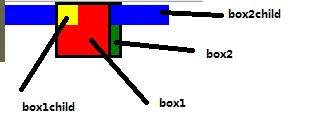
box1 和 box2child 会被放置与 dom 元素不一样的层级树中,且 box1 的层级大于 box2child
box1 和 box2child 在同一个层级树中,且 box1 大于 box2child,所以 box1 的父子元素都比 box2 的父子元素层级高
<div class="box1 red box">
  <div class="box1child  yellow"></div>
</div>
<div class="box2 green box">
  <div class="box2child  blue"></div>
</div>
* {
  margin: 0;
  padding: 0;
}
.box {
  width: 50px;
  height: 50px;
  border: solid;
  display: inline-block;
}
.red {
  background: red;
}
.green {
  background: green;
}
.yellow {
  background: yellow;
}
.blue {
  background: blue;
}
.box1 {
  position: relative;
}
.box2 {
  position: relative;
}
.box3 {
  position: relative;
}
.box1child {
  position: relative;
}
.box2child {
  position: relative;
}
.box3child {
  position: relative;
}
.box1childchild {
  position: relative;
  width: 170px;
  height: 20px;
  margin-top: 10px;
  background: bisque;
  z-index: 100;
}
.box2childchild {
  position: relative;
  width: 40px;
  height: 40px;
  margin-top: 5px;
  background: greenyellow;
  z-index: 10;
}
.box3childchild {
  position: relative;
  width: 40px;
  height: 50px;
  background: palevioletred;
  z-index: 1;
}
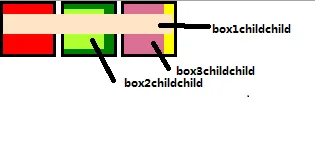
body 下第一层含有定位元素整数 z-index,会被放置到与 dom 元素不一样的层级树中
box1childchild、box2childchild、box3childchild 三者在同一层级树,所以三者的层级关系是 box1childchild>box2childchild>box3childchild
<div class="box1 red box">
  <div class="box1child">
    <div class="box1childchild"></div>
  </div>
</div>
<div class="box2 green box">
  <div class="box2child">
    <div class="box2childchild"></div>
  </div>
</div>
<div class="box3 yellow box">
  <div class="box3child">
    <div class="box3childchild"></div>
  </div>
</div>
浮动元素与定位元素的层级关系
定位>浮动
* {
  margin: 0;
  padding: 0;
}
.box {
  width: 50px;
  height: 50px;
  border: solid;
  display: inline-block;
}
.red {
  background: red;
}
.green {
  background: green;
}
.yellow {
  background: yellow;
}
.blue {
  background: blue;
}
.box1 {
  position: relative;
  right: 50px;
}
.box2 {
  position: relative;
  right: 80px;
}
.box3 {
  float: left;
}
<div class="box1 red box"></div>
<div class="box2 green box"></div>
<div class="box3 yellow box"></div>
确认评论邮箱
邀请制评论